
Halt! Who goes there!
May 3, 2021
If we publish a blogging platform to the internet with no security, bad people will post spam and mess it up for everyone. Let’s add a sign-in form to keep the bad guys out.
I like the Sorcery gem because it just quietly does its thing without imposing its opinions on registration flow like Devise does.
From the Sorcery readme:
// Gemfile
gem 'sorcery'
bundle install
rails generate sorcery:install
rails db:migrate
That will have created a User model for us.
class User < ApplicationRecord
  authenticates_with_sorcery!
end
We’ll need a SessionsController for the sign in method.
rails g controller SessionsI think it’s interesting to show the tests for this. It can be a mini-tutorial for folks who have never used Sorcery before and need help writing integration tests with it.
require "test_helper"

class SessionsControllerTest < ActionDispatch::IntegrationTest
  setup do
    @sally = User.create! email: 'sally@example.com',
                          password: 'letmein'
  end

  test 'sign in renders a form' do
    get sign_in_url
    assert_response :success

    assert_select 'form' do
      assert_select '#credentials_email'
      assert_select '#credentials_password'
      assert_select 'input.submit'
    end
  end

  test 'redirect to home page after sign in' do
    post sessions_url, params: {
        credentials: {
            email: 'sally@example.com',
            password: 'letmein',
        }
    }
    assert_redirected_to root_url
  end

  test 'rerender the form if sign in fails' do
    post sessions_url, params: {
        credentials: {
            email: 'sally@wrong.com',
            password: 'wrong',
        }
    }
    assert_response :success

    assert_select '.form' do
      assert_select '.error', 'Invalid Login'
      assert_select '#credentials_email' do |elements|
        assert_equal 'sally@wrong.com', elements[0][:value]
      end
    end
  end
end
// routes.rb

  resources :sessions
  get :sign_in,  to: 'sessions#new', as: :sign_in
class SessionsController < ApplicationController
  def new
  end

  def create
    credentials = credential_params

    login(credentials[:email], credentials[:password]) do |user, failure|
      if failure
        @email = credentials[:email]
        @error = failure
        render action: 'new'
      else
        redirect_back_or_to(:root)
      end
    end
  end

  private
  def credential_params
    params.
        require(:credentials).
        permit(:email, :password)
  end
end
The view is pretty simple but it took me a while to remember how to write ERB. I usually use HAML as it’s so much easier to read and write.
-# views/sessions/new.html.erb
<div class='session-page'>
  <div class='session-panel'>
    <h1>Sign in</h1>

    <%= form_for :credentials, url: {action: :create}, html: {class: 'form'} do |form| %>
      <div class='error'>
        <%= t @error %>
      </div>
      <div class='input email'>
        <%= form.label :email %>
        <%= form.email_field :email,
                             value: @email,
                             required: true,
                             autofocus: true,
                             placeholder: 'Enter your email address'
        %>
      </div>
      <div class='input password'>
        <%= form.label :password %>
        <%= form.password_field :password,
                                required: true,
                                placeholder: 'Enter your password' %>
      </div>
      <div class='actions'>
        <%= form.submit 'Sign in', class: 'button submit primary' %>
      </div>
    <% end %>
  </div>
</div>
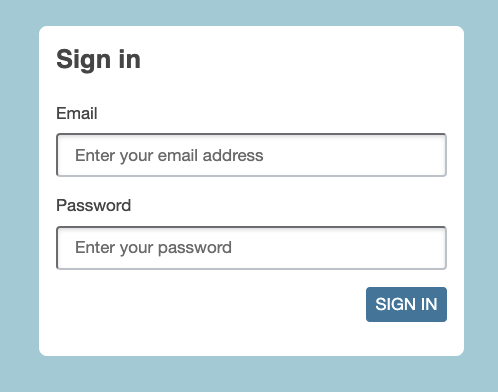
That test passes and a little bit of CSS magic gives me this
I’d like the sign in to be in React someday but it’ll be a distraction for now and I’ll come back to it later. No one said that all my UI must be in React anyway.
If I create a user in the Rails console, I’ll be able to sign in.
User.create! email: 'sally@example.com', password: 'letmein'
Now we can protect the important controller actions. I find it safest to require login on everything and to then make exceptions for the public-facing actions.
class ApplicationController < ActionController::Base
  before_action :require_login

class PostsController < ApplicationController
  skip_before_action :require_login, only: [:index, :show]

class SessionsController < ApplicationController
  skip_before_action :require_login
If I run all the Rails tests now, I see a failure.
PostsControllerTest#test_create_a_blog_post:
Expected response to be a <2XX: success>,
but was a <302: Found> redirect to <http://www.example.com/>
Response body: <html><body>You are being <a href="http://www.example.com/">redirected</a>.</body></html>
I can update the test to sign in first.
  test 'create a blog post requires a sign in' do
    post posts_url(format: :json), params: {
        post: {
            title: 'A new day',
            body: 'First post!'
        }
    }
    assert_redirected_to root_url
  end

  test 'create a blog post' do
    sign_in @sally
    post posts_url(format: :json), params: {
        post: {
            title: 'A new day',
            body: 'First post!'
        }
    }
    assert_response :success
    # ...
  end
The sign_in method exists in a test helper:
module TestHelpers
  module AuthenticationTestHelper
    def sign_in user, options={}
      password = options[:password] || 'letmein'
      post sessions_url,
           params: {
               credentials: {
                   email:    user.email,
                   password: password
               },
           }
    end
  end
end
It’s a bit of faffing to set up a test helper that is accessible to all the tests, but it make them more readable if you do.
# test/test_helper.rb
ENV['RAILS_ENV'] ||= 'test'
require_relative "../config/environment"
require "rails/test_help"
Dir['test/test_helpers/*.rb'].each {|file| require file.sub(/^test\//, '') }

class ActiveSupport::TestCase
  parallelize(workers: :number_of_processors)
  fixtures :all
end

class ActionDispatch::IntegrationTest
  include TestHelpers::JsonTestHelper
  include TestHelpers::AuthenticationTestHelper
end
While I am here, I’ll create a test helper for JSON testing too. That’s been bothering me for a while. I just updated the test above to use it.
module TestHelpers
  module JsonTestHelper
    def json_response options={}
      assert_response options[:expected_response] || :success
      JSON.parse response.body, symbolize_names: true
    end
  end
end
The last thing left to do is to hide the post Editor if the user is not signed in. There are a bunch of ways we can send the current user to the React client. The easiest, for now, is to add a data property to the div that contains the React application. We can do something more sophisticated later.
<div id='react' data-user-id='<%= current_user&.id%>' />
We can read this property from Javascript and store it somewhere where it is accessible from any component.
I’m sure this will get more complex later but let’s keep it simple for now.
// users/current_user.js
const current_user = {
  id: null,
}

export function signIn(id=true) {
  current_user.id = id
}

export function signOut() {
  current_user.id = null
}

export function signedIn() {
  return current_user.id
}
We can read the ID and store it when the app loads.
// application/index.jsx
document.addEventListener('DOMContentLoaded', () => {
  const react = document.querySelector('#react')
  signIn(react.getAttribute('data-user-id'))
  // ...
Now we can call the signedIn() method from the editor and render nothing if the user is not signed in.
if(!signedIn()) return null
We can also call signIn() and signOut() in our tests.
Post a Comment