What do you want to see?
Posted on May 2nd, 2021
As of now, we can create a new post and we can show one hard-coded post. It’s almost time to add some structure and navigation to our app. Let’s show a list of posts first, though, and we can think about how we navigate between items later.
Let’s add a list component to show all the posts. We’ll fake it in the front end…
export function Main() {
  return <div id='main'>
    <Editor onSubmit={create} />
    <List />
  </div>
}
// /javascript/posts/List.jsx
export default class List extends React.Component {
  render() {
    return 'list of posts'
  }
}
… until we have the backend in place.
The posts.index action in PostsController will return the React application if you request HTML and a list of posts if you request JSON.
# PostsControllerTest.rb

test 'the index page just returns the react application' do
  get posts_url
  assert_select '#react'
end

test 'fetch a list of posts as json' do
  get posts_url(format: :json)
  assert_response :success
  json = JSON.parse response.body, symbolize_names: true

  assert 1, json[:posts].count
  assert 'The title', json[:posts][0][:title]
end
# PostsController.rb

def index
  @posts = Post.all.order(created_at: :desc)
end

# index.json.jbuilder
json.posts do
  json.array! @posts do |post|
    json.extract! post, :id, :title, :body, :created_at, :updated_at
  end
end
And, if I open http://blogging.local:3000/posts.json in the browser, I see my posts. Now to fetch them from the client.
I’ll add an API methods to fetch the list of posts…
// posts/api.js

export function list() {
  return server.get(`/posts.json`)
}
…and update the List component to call it and render the list.
export default class List extends React.Component {
  constructor(props) {
    super(props)
    this.state = {
      posts: null
    }
  }

  render() {
    const {posts} = this.state
    if(posts === null) return 'Loading…'

    return <ul className='posts-list'>
      {
        posts.map(post => <li key={post.id}>
          <Post post={post}/>
        </li>)
      }
    </ul>
  }

  async componentDidMount() {
    const response = await list()
    this.setState({posts: response.posts})
  }
}
That’s all straightforward, I think, except: note the key property in <li key={post.id}>.
React performs optimisations by keeping track of changes to the React component tree and only re-rendering components that have changed since the last render. When you render an array of components you should provide a unique key to each component to help React figure out what has changed.
If I run all the Javascript tests now, I see a failure in the top-level Application.test.jsx because it is still expecting a single Post component rather than a list.
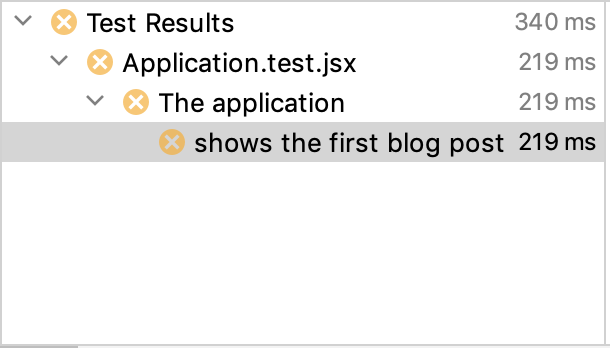
Let’s fix that.
// Application.test.jsx

describe('The application', () => {
  server.send = jest.fn()

  const post = {
    id: 1,
    title: 'React on Rails',
    body: 'I can use React with Rails.',
  }

  const posts = [post]

  beforeEach( () => {
    // Return a list of posts instead of a single post
    server.send.mockReturnValue({posts})
  })

  test('shows a list of blog posts', async () => {
    const component = await display(<Application />)
    component.update()

    assert_select(component, '.site-name',   'Blogging')
    assert_select(component, '.post .title', 'React on Rails')
    assert_select(component, '.post .body',  'I can use React with Rails.')

    expect(server.send).toBeCalledWith('/posts.json')
  })
})
I’m not sure why, but I had to add component.update() to get the list component to render the correct HTML (I think this might be a bug in Enzyme).
I like to think of the top-level Application.test as a kind of smoke test that tests the whole application from end to end, albeit in a rather shallow fashion. It won’t tell us anything profound about the application’s behaviour but it might flag some future regression that would be missed by lower-level unit tests.
As I did with the Post.test, I’ll duplicate this test as a unit test so I can test the List component more thoroughly. But first I am going to split the component into a List that knows how to render a list of posts and a ConnectedList that knows how to fetch a list of posts from the server.
This seems like a lot of faff when I am typing it into WordPress but it’s literally 10 seconds of copy-paste in the IDE and my future self will thank me when I need to write more complex tests and I can do so without loading the whole framework.
Here’s the code.
// posts/List.jsx

export function List({posts}) {
  return <ul className='posts-list'>
    {
      posts.map(post => <li key={post.id}>
        <Post post={post}/>
      </li>)
    }
  </ul>
}

export default class ConnectedList extends React.Component {
  constructor(props) {
    super(props)
    this.state = {
      posts: null
    }
  }

  render() {
    const {posts} = this.state
    if(posts === null) return 'Loading…'
    return <List posts={posts} />
  }

  async componentDidMount() {
    const response = await list()
    this.setState({posts: response.posts})
  }
}
And here are the tests: one for the List and one for the ConnectedList.
// posts/List.test.jsx
describe('The post list', () => {
  server.send = jest.fn()

  const post = {
    id: 1,
    title: 'React on Rails',
    body: 'I can use React with Rails.',
  }
  const posts = [post]

  test('shows a list of blog posts', () => {
    const component = display(<List posts={posts}/>)

    assert_select(component, '.posts-list .post', 1)
    assert_select(component, '.post .title', 'React on Rails')
    assert_select(component, '.post .body',  'I can use React with Rails.')
  })

  test('fetches the list of blog posts from the server', async () => {
    server.send.mockReturnValue({posts})

    const component = await display(<ConnectedList />)
    component.update()

    assert_select(component, '.posts-list .post', 1)
    expect(server.send).toBeCalledWith('/posts.json')
  })
})
A quick test in the browser shows that I can show a list of posts from the server and I can create a new one except… Ooops!… the new one doesn’t get added to the list unless I refresh the page.
This is the kind of problem that Redux will solve for us but I have a different approach in mind. We’ll give it a try in the next episode.